

Many sequencing analysis tools can work within a Windows operating system just fine, however, sometimes, at some point, you might find that the best tool for the job was designed to solely work in a unix environment. What now? Well, did you know there can be a Linux within your Windows?
Introduction
Many researchers will have started off learning their first analytical strategies using tools such as Microsoft Excel early in their education. For certain research-fields this one tool might be all you’d need, however, as soon as the data increases in volume and complexity it might become time to get increasingly familiar with using some programming languages such as R Python. Although both R and Python are great languages to work with, when it comes to sequencing data analysis there will come a point that a UNIX environment will be required. You may decide to buy a Macbook, which has a UNIX-environment build in, but did you know you can also run a Linux distro from your Windows OS?
Lets do this!
If you have a computer running Windows 10 or later, then you might be surprised to know that it comes packed with a UNIX environment from the factory. This feature is however, buried in regions of your computer that you’re unlikely to deal with unless your already a software developer. This system that you’re looking for is called the Windows Subsystem for Linux (WSL 2).
Open the command prompt terminal app and install the WSL along with the Ubuntu Linux distro.
wsl.exe --install -d ubuntu
If installation was successful you will see a message asking you to reboot your system.

Once you will have rebooted a terminal window will open and you will continue to install and evantually ask you to set up a Ubuntu username and password. These don’t need to be the same as your Windows username and password, and you might want to write these down somewhere safe, so that you won’t forget.
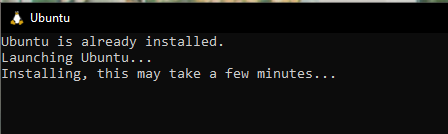
You will now be able to launch your bash terminal from the ubuntu app in your start menu and you are free to use this terminal for all your Unix needs. To test out your freshly minted linux environment it might be good to try and update your system.
Check which repositories have updates ready by running.
sudo apt update
Then upgrade those programs by running:
sudo apt upgrade
If all went well, you will now have Ubuntu running within your Windows operating system. It might not seem all that interesting straight away, but this terminal window will eventually become a valuable tool in your data analysis toolkit.